How Can We Help?
-
Govlink Webportal
-
eu-LISA EES
-
Passenger Clearance Statuses
-
Country-Specific Regulations
-
Sanction List
-
Partner Interface
-
What's New
-
Glossary
In case of UK GAR outage, download the GAR with your last data (see steps below) and send it to ncu@hmrc.gov.uk.
1- Go to your GOVLINK account
2- Click on the Ad-hoc push and select GAR
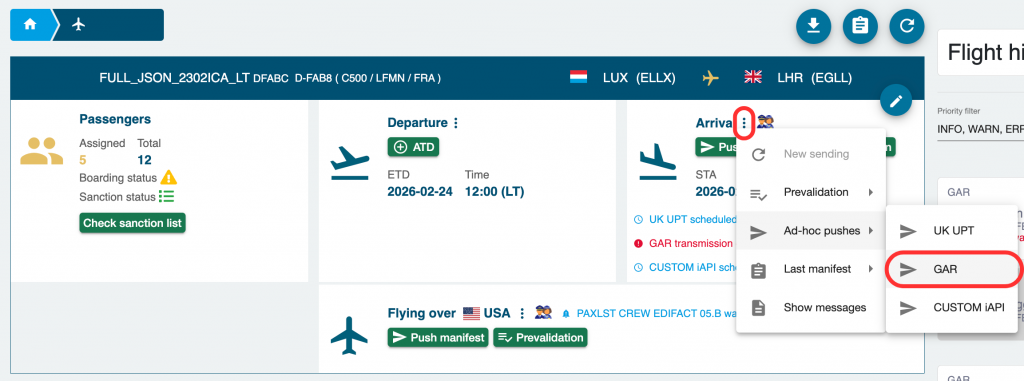
3- Wait 1 minute and refresh your screen, you should see a “transmission error”. If you don’t, repeat this step
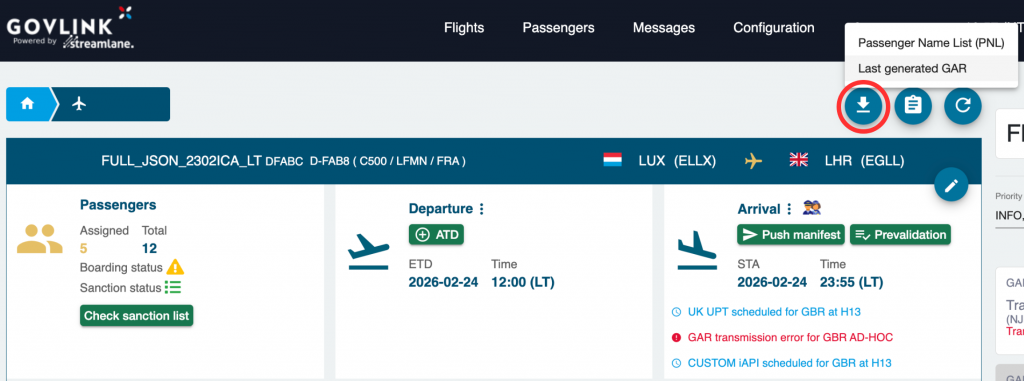
4- Click on the “download icon” and select the “last generated GAR” file
Send the downloaded GAR to ncu@hmrc.gov.uk.