
Last Transmitted Manifest
The Last Transmitted Manifest provides an overview of the most recent transmissions, including the passenger or crew list, identity document details, and boarding or clearance statuses.
It is available only for interactive states that return passenger status data — such as the United Kingdom, United Arab Emirates, and Canada.
How to get your Last Transmitted Manifest
1. Navigate to the flight screen in GOVlink.
2. Click the three vertical dots (⋮) to the right of Departure/Arrival.
3. Select Last Manifest and choose your preferred option (e.g., passenger or crew). Available options may vary depending on the country.
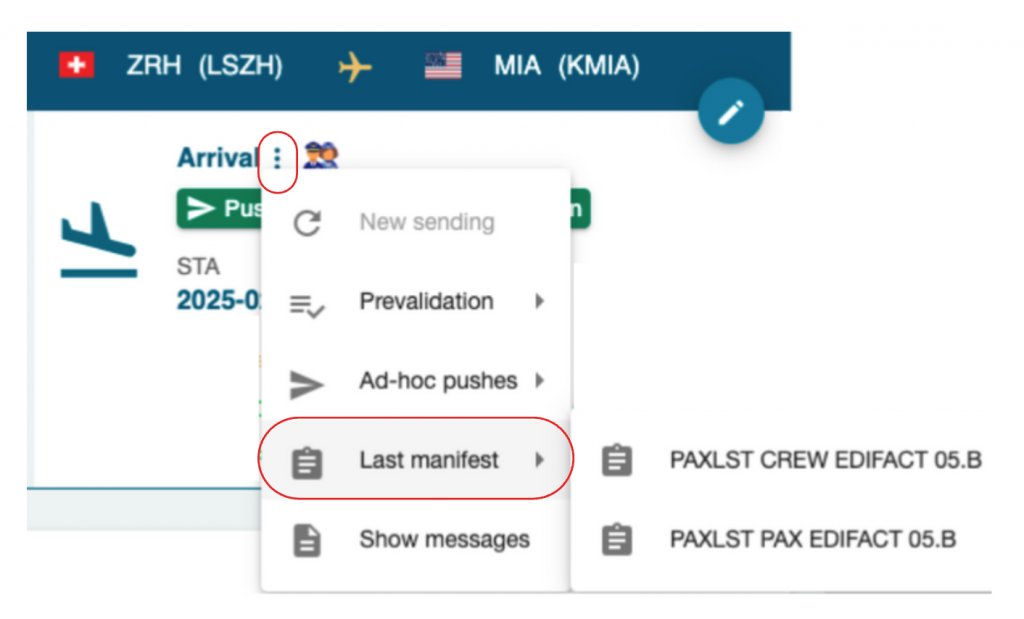
4. The Last Transmitted Manifest window will open, showing the transmitted records.

5. To download or print the manifest, click the green button at the bottom-right corner. This opens a printable version that can be saved as a PDF.